Precision Finding on Apple Watch Doesn't Work With the Original AirTag

A new Apple support document and our own testing has confirmed that Precision Finding on the Apple Watch Series 9 and later and Apple Watch Ultra 2 and later works with the AirTag 2, but the original AirTag is not supported.
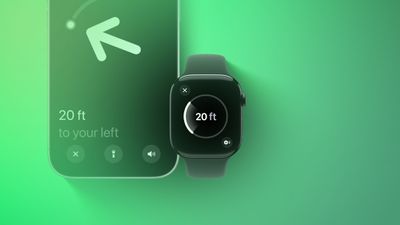
Precision Finding Apple Watch Feature
Apple has not indicated why this feature does not work with the original AirTag. However, the new AirTag is equipped with Apple's second-generation Ultra Wideband chip, while the original has Apple's first-generation Ultra Wideband chip.

Precision Finding can lead you to the exact location of an item with an AirTag attached to it, by showing you a directional arrow and your distance away from the item on a compatible iPhone, and now on a compatible Apple Watch too.

Precision Finding already existed on the above Apple Watch models for finding an iPhone 15 or newer, but there was no Precision Finding on the Apple Watch for finding an AirTag until now. As we confirmed, however, Precision Finding on the Apple Watch still does not work with the first-generation AirTag released in 2021.

To use Precision Finding to find a second-generation AirTag with a compatible Apple Watch, the watch must be running watchOS 26.2.1 or later.

How to set up the feature, according to Apple:

  1. On your Apple Watch, go to Control Center.
  2. Scroll to the bottom and tap Edit.
  3. Tap the Add button.
  4. Scroll down to Find Items.
  5. Tap Find Items, then tap Find AirTag.
  6. Tap Choose, then choose an item.
  7. Tap the Done button, then tap Done.

How to use the feature, according to Apple:

  1. On your Apple Watch, go to Control Center.
  2. Scroll down and tap the Find AirTag button.
  3. Follow the on-screen instructions and move around your space until your Apple Watch connects to your AirTag.
  4. Follow the distance and direction information on your Apple Watch. When you are close to your AirTag, the watch screen turns green.

If you have an original AirTag, you can still find it with Precision Finding on an iPhone 11 or newer.

With the AirTag 2, Precision Finding works at distances up to 1.5× farther away from an item compared to the original AirTag, but this longer range requires an iPhone 15 or newer, Apple Watch Series 9 or newer, or Apple Watch Ultra 2 or newer.

To learn more about the new AirTag, read our coverage of Apple's announcement.

Related Roundup: AirTag

Popular Stories

iOS 26

iOS 26.3 and iOS 26.4 Will Add These New Features to Your iPhone

Tuesday February 3, 2026 7:47 am PST by
While the iOS 26.3 Release Candidate is now available ahead of a public release, the first iOS 26.4 beta is likely still at least a week away. Following beta testing, iOS 26.4 will likely be released to the general public in March or April. Below, we have recapped known or rumored iOS 26.3 and iOS 26.4 features so far. iOS 26.3 iPhone to Android Transfer Tool iOS 26.3 makes it easier...
imac video apple feature

Apple Makes Its Second-Biggest Acquisition Ever

Tuesday February 3, 2026 12:45 pm PST by
Apple recently acquired Israeli startup Q.ai for close to $2 billion, according to Financial Times sources. That would make this Apple's second-biggest acquisition ever, after it paid $3 billion for the popular headphone maker Beats in 2014. This is also the largest known Apple acquisition since the company purchased Intel's smartphone modem business and patents for $1 billion in 2019....
Apple Logo Zoomed

Tim Cook Teases Plans for Apple's Upcoming 50th Anniversary

Thursday February 5, 2026 12:54 pm PST by
Apple turns 50 this year, and its CEO Tim Cook has promised to celebrate the milestone. The big day falls on April 1, 2026. "I've been unusually reflective lately about Apple because we have been working on what do we do to mark this moment," Cook told employees today, according to Bloomberg's Mark Gurman. "When you really stop and pause and think about the last 50 years, it makes your heart ...
iphone 16 pro colors 1

Apple Begins Selling Refurbished iPhone 16 and iPhone 16 Pro Models at Lower Prices

Wednesday February 4, 2026 7:44 am PST by
Apple today began selling certified refurbished iPhone 16, iPhone 16 Plus, iPhone 16 Pro, and iPhone 16 Pro Max models on its online store in the U.S., with prices discounted by 12% to 22% compared to Apple's current or former pricing for the devices. Here were Apple's starting prices when the devices launched in September 2024: iPhone 16: $799 iPhone 16 Plus: $899 iPhone 16 Pro:...
Apple TV Color

Apple TV Announces 12 New Shows and Films Coming This Year

Wednesday February 4, 2026 12:29 pm PST by
Apple on Tuesday previewed 12 new shows and films that will be premiering on the Apple TV streaming service throughout 2026. The new series: Imperfect Women — March 18, 2026 Margo's Got Money Troubles — April 15, 2026 Widow's Bay — April 29, 2026 Maximum Pleasure Guaranteed — May 20, 2026 Cape Fear — June 5, 2026 Lucky — July 15, 2026 The new films: Eternity — ...

Top Rated Comments

bozzykid Avatar
2 weeks ago

can someone explain why you'd use your watch and not your phone?
Your watch is on your actual wrist and with you at all times. That's like saying, "Why use an Apple Watch? Your phone tells the time."
Score: 14 Votes (Like | Disagree)
nuff_said Avatar
2 weeks ago
I wish I could say, if not a bug, I’m shocked. /s
But I’m not and you shouldn’t be either
Score: 7 Votes (Like | Disagree)
christian.terra Avatar
2 weeks ago

Your watch is on your actual wrist and with you at all times. That's like saying, "Why use an Apple Watch? Your phone tells the time."

Not everyone has an iPhone with an Ultra Wideband chip in it but many have an Apple Watch with it.

I’ve run into this scenario many times. Kids take the phone and I’m scrambling to find my AirTagged keys. HomePod is hit or miss so having the ability to use my Watch would be a plus with all our existing tagged items.
All good points - i guess since we never had the functionality, it seems strange to me.
Score: 4 Votes (Like | Disagree)
KrisLord Avatar
2 weeks ago
Got my new tag today.

Apple Watch and iPhone updated.

Precision finding works fine from iphone.

From an Apple Watch, if you find via the ‘find items” app then it doesn’t do precision find. If you use control center (add the option to find a tag) then it does.

I can’t help but think the watch update is a bit half baked.
Score: 3 Votes (Like | Disagree)
Slix Avatar
2 weeks ago

can someone explain why you'd use your watch and not your phone? I can't think of a scenario where you'd only have your watch unless you lose BOTH your airtagged item and phone.
Not everyone has an iPhone with an Ultra Wideband chip in it but many have an Apple Watch with it.
Score: 3 Votes (Like | Disagree)
hagjohn Avatar
2 weeks ago
Probably because of the second-generation Ultra Wideband chip, is more precise.
Score: 3 Votes (Like | Disagree)